

Sale!
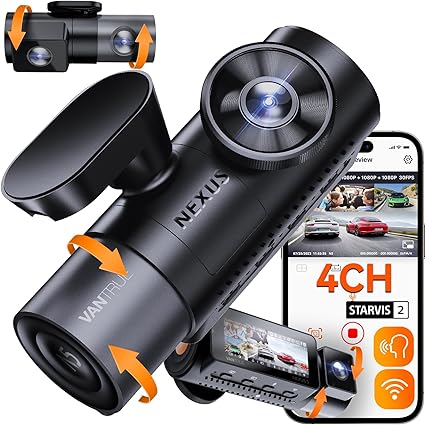
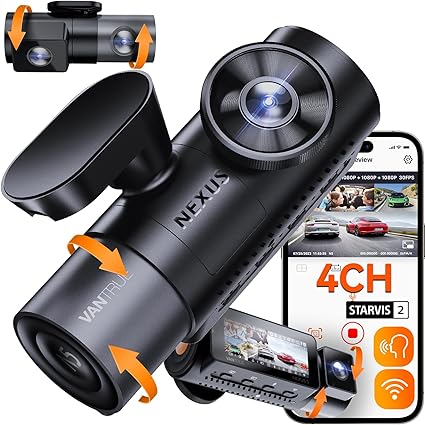
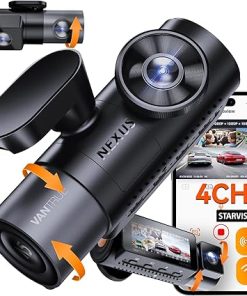
Dash Camera-VANTRUE-Vantrue N5 4 Channel WiFi 360° All Sides Dash Cam- STARVIS 2
Original price was: $399.99.$160.00Current price is: $160.00.
car camera dash cam,recommended dash camera,garmin dash cameras,wireless dash cameras for cars,auto dash cameras,dash camera for car front and rear,good car dash camera
62 in stock
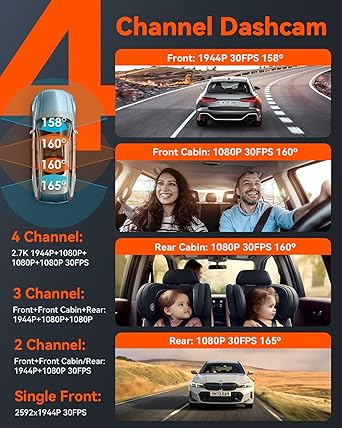
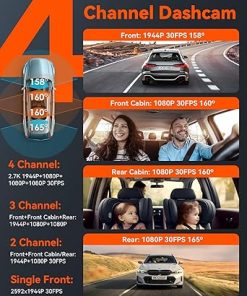
- [ 4 Channel 360° Wide Angle Recording ] Adopted dual-core processor, this world’s first 4 channel dash cam with 158° front camera, 160° front cabin camera, 160° rear cabin camera and 165° rear camera can record the front, rear, cab and sides of car simultaneously, achieving a groundbreaking 360 degrees coverage without blind spots at a maximum resolution of 2.7K (1944P)+1080P+1080P+1080P, 4x protection, 360° full-guard. Various recording mode(1CH/2CH/3CH/4CH) for you to select freely as needed.
- [ Industry First Rear Cabin Camera ] The unique rear cabin camera captures the complete area of your trunk, back seat and side windows to help you monitor the kids or pets sit in back seat and the luggages in the trunk. Integrated with front cabin camera, this four channel dash camera provides a perfect solution for monitoring the collision, the hit-and-run and the thief who breaks the car windows from sides, giving you added peace of mind when driving and parking.
- [ STARVIS 2 & IR Night Vision ] STARVIS 2’s remarkable performance in NIR and noise reduction allows this 4 way dash camera to captures high-speed objects including license plates clearly even in dark or backlighting conditions. Front inside and rear inside cameras with infrared lights record crisp cabin images even in unlit environment, greatly improve nighttime driving safety, making it a perfect choice for Uber, Rideshare, Lyft, Taxi, commercial fleet drivers and families.
- [ 5G WiFi & GPS & OTA Upgrade ] With 5G WiFi and dual system GPS module, this 4 lens dash cam boasts 4x faster transfer speed and more accurate positioning function. It allows you to adjust settings, preview, edit and share online, track location, live speed in KM/H or MPH and route via free Vantrue APP. One click to download mileage analysis reports which serve as crucial evidence after road incidents. OTA upgrade enables you to directly update firmware version via the app. Easy and efficient.
- [ 24/7 Buffered Parking Mode ] Connected with hardwire kit (Buy Separately), N5 will auto switch to parking mode when your car is off and record anything suspicious around your car when triggered by movement or collision, providing vital evidence for you when your parked car is scratched or broken into. Supported by buffered motion detection, it’ll help you record the whole event with all necessary details. Low frame rate mode will greatly save storage space, perfect for long-time parking.
- [ Smart Voice Control & Easy to Detach ] This 4 camera dash cam can be easily controlled by multiple languages voice commands (English, Russian, Chinese, French and Japanese), which allows you to save video, take photo, start video, turn on/off audio, turn on /off WiFi, turn on/off screen by speaking simple voice commands, effectively reduce distraction and improve driving safety. Magnetic mount allows you to detach the camera from the mount easily without messing cables.
- [ Reliable Witness for Accident ] Loop recording auto overwrites the oldest file when the card is full. Variable sensitivity G-sensor auto detects collision and emergency locks the videos to event folder to prevent the video from overwritten. Benefited from super capacitor and heat-resistant materials, this 4 lens dashcam features excellent temperature resistance, long lifespan and high safety, which can well adapted to extreme temperature environment such as Southern California and New York.
what our customer say this product:
Powered by
| 5 star | 100% | |
| 4 star | 0% | |
| 3 star | 0% | |
| 2 star | 0% | |
| 1 star | 0% |
Only logged in customers who have purchased this product may leave a review.
Related products
Sale!
Original price was: $189.99.$95.00Current price is: $95.00.
Sale!
Original price was: $99.99.$54.99Current price is: $54.99.
Sale!
120cm AUX Cable
Original price was: $119.56.$59.78Current price is: $59.78.
Sale!
Original price was: $399.28.$159.71Current price is: $159.71.
Sale!
Original price was: $139.99.$70.00Current price is: $70.00.
Sale!
Original price was: $101.99.$51.00Current price is: $51.00.
Sale!
Original price was: $119.99.$60.00Current price is: $60.00.
Sale!
Original price was: $144.49.$72.25Current price is: $72.25.
Rizwan M. Verified Buyer –
It good but still needs to improve as it hangs due to heating issues and WiFi connection is not clearly mentioned
Y más novedades Verified Buyer –
Regular, nada sobresaliente en cuanto a imagen la app falla muchísimo la conectividad con la cámara me parece muy alto el precio en relación al funcionamiento general de la cámara
Val jhon Silverio Verified Buyer –
I am so happy with this purchase! This dashcam can have you security and insurance purposes. I love the box and package well organized and makes that product a good quality.
The things that I am the most impressed with this dashcam are:
1. The video quality is AMAZING. I used the app to download a video and saw how good the quality is. Other car’s plate number is still very visible even when they are far.
2. I really like how wide viewing angle. The camera sees everything, which is what I look for in dash cams.
3. loop recording, G-sensor and parking mode, gps functionality, night vision, screen and control and I can also connect it to my phone.
It is also easy to install. Plug and play and also comes with the tools and everything you need to so you can install it your own.
Give it a try and won’t regret it !!
Mark Szczewski Verified Buyer –
TLDWTR: (Too Long Don’t Want To Read): This is a great 4 channel dash cam system. It came well packaged, has high build quality, fantastic image grade, comes from a reputable company, and has a well-built application backing it.
Full Review:
My Vantrue N5 arrived amazingly quickly and safely packaged. Once I removed it from the shipping materials, I was presented with a smartly packaged camera and the components to make it work.
Laying out everything on my kitchen table, I found there to be the following included:
– 1 Front camera (with front interior cabin camera)
– 1 Rear camera (with rear interior cabin camera)
– 1 GPS mount (for the front camera)
– 1 USB C 12v adapter (with additional USB A plug for phone charging)
– 1 USB C to USB A data cable (for connecting your camera to your computer)
– 1 20 ft USB C cable (for power and signal between the rear and front cameras)
– 2 Electrostatic sheets (for between your windows and the 3M adhesive of the cameras)
– 2 Primer wipes (for prepping the windows)
– 2 Protected by Vantrue stickers
– Some additional 3M adhesive (should you opt to relocate your cameras or remote)
– 1 Plastic prybar/removal tool
– 1 Microfiber cloth (for wiping off fingerprints)
– 1 Comprehensive manual
*You must supply a MicroSD card to complete this setup and a hardwiring kit if you want your system wired to something other than the 12v adapter in your vehicle.
The night before my installation, I updated the camera’s firmware from the comfort of my kitchen table. I hooked a USB C cable up to a portable battery and installed the Vantrue application on my phone while the camera powered up. With the power on and the app installed, I could start the camera’s configuration. You’ll be prompted to select a language, timezone, and other basic options from the camera at the initial power-on using the buttons on the bottom edge. After turning on the built-in WiFi (2.4 or 5ghz), you can move to your phone for the more advanced configuration.
As I selected the camera in the application, it prompted me that there was a firmware update for my new camera and that it could download and install them for me (both front and rear camera units had firmware updates). This process was quick and worked flawlessly. I was ready to dig into the application once the camera had completed the installation and restarted. The application gives you the ability to synchronize the time on your camera from your phone (an excellent quality of life improvement), select resolutions and frame rates for the cameras, disable cameras you might not want to use, configure the information that will or won’t be overlaid on the bottom edge of your recordings (date/time, license plate #, GPS coordinates, speed, and branding), as well as a multitude of other options. With these options set, I was ready to do the installation the next day in my vehicle.
I got to the installation on my 2018 F-150 in the afternoon. It took about an hour to get everything installed and all the cables tucked away. As advice for anyone attempting this install, be sure to use those included electrostatic sheets between your windows and the camera’s 3M adhesive. Removing that adhesive a couple of years later is a tough job.
I mounted the front camera on the passenger side of my vehicle, up behind my rearview mirror, over just far enough that the front internal cabin-facing camera could see everyone but me, the driver. This location also keeps the camera out of my regular line of sight while driving. The power for this camera comes from an adapter between my rearview mirror and the power feed into it. This camera is bigger than others I have seen due to the addition of the cabin camera.
I then ran the USB C cable for the rear camera up and around my windshield, tucked up into the header, and down the passenger side A-pillar (after removing the cover to ensure I didn’t get tangled up with the side curtain airbags). From there, it ran along the door trim sill plate until coming back up along the rear passenger pillar and tucked in behind the soundproofing material on the back of the truck cabin. Coming into the installation, I figured the 20ft of USB C cable would be too much; by this point, I started to get nervous about the length of cable I had left. Luckily, I had just enough, about 8 inches in surplus. Plan when you are choosing your path for cable routing!
I mounted the rear camera above the center seatbelt reel on my backseat so that it was out of the way of my sliding rear window (which opens to the passenger side on the Gen13 F-150s). With this location, I could keep it mostly centered on the truck and capture the tailgate of my vehicle and most of the bed and surrounding areas off to the sides. Additionally, thanks to the flexibility of the camera and the application for managing it, I could flip the image since my rear camera is technically upside down.
I could start using my new cameras with all the configurations set from the night before. Overall, I am blown away by the quality of the images coming from the front camera. The image sensor is a marked improvement over other cameras I have seen and used in the past. The rear and both cabin cameras are limited to 1080p, so they aren’t the most powerful but should be sufficient for most people’s needs.
The application allows real-time viewing of the cameras, cycling between fullscreen views of each camera, and pulling videos and images to your phone for use elsewhere. In its current version, the application works well, finds my camera each time, and moves content quickly. The ability to support multiple cameras (should you have a second car with a Vantrue camera installed) is a great bonus.
I’ve included a sample of the footage from both the front and rear cameras (sorry, not the inside since the kids wanted to ride along).
I am exceedingly happy with this purchase and would strongly recommend this product.
Alberto Castillo Verified Buyer –
La compre en junio (2024) y al día de hoy viernes 9 de agosto del (2024) salió una línea en la pantalla… que estresante y que coraje que una cámara que me costó al rededor 445 dls (casi 9000 pesos mexicanos) falle de esa forma.